FreeWebCheck
Browser Fingerprinting: The Tracking Method That Works Without Cookies
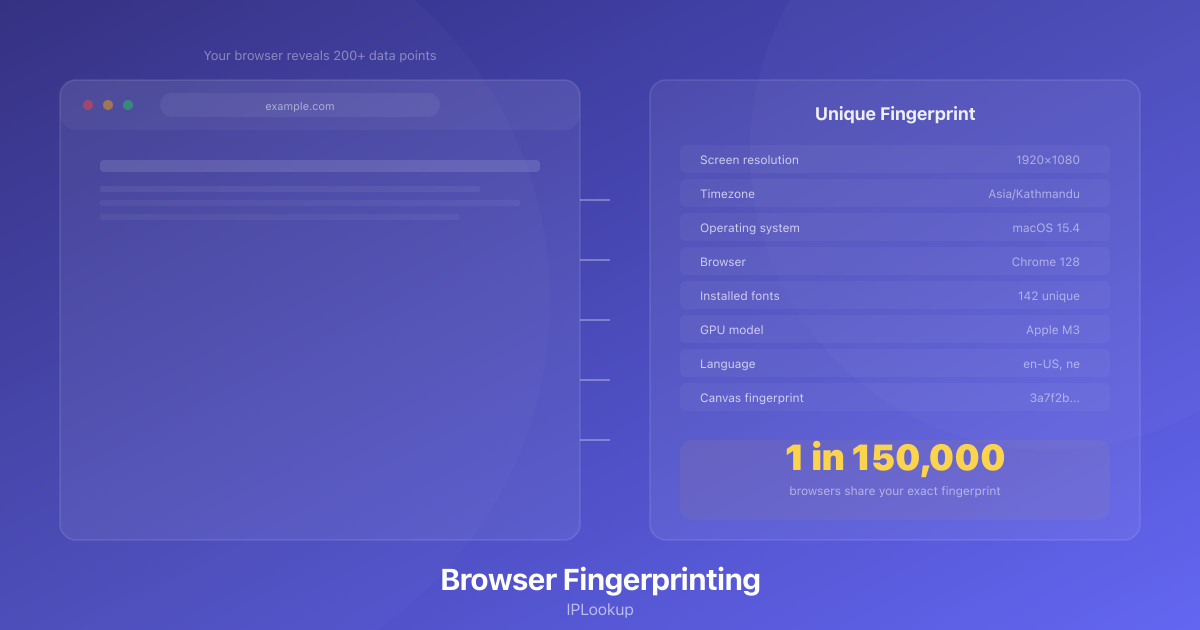
I ran my browser through a fingerprinting test last week at Cover Your Tracks, a tool built by the Electronic Frontier Foundation. It returned a 1-in-150,000 uniqueness score. That means out of 150,000 browsers in their sample, mine was the only one with this exact combination of fonts, screen resolution, timezone, GPU model, browser version, and dozens of other settings. I hadn’t installed anything unusual. I wasn’t running a niche operating system. My browser was just mine.
That’s browser fingerprinting. And it’s probably happening to you right now without your knowledge.
How It Works
When your browser connects to a website, it volunteers a surprising amount of information just as part of normal operation. Your screen resolution, timezone, language preferences, browser version, operating system, list of installed fonts, whether you have an ad blocker active, your GPU model, your CPU core count — there are over 200 measurable signals in a typical modern browser.
Individually, each piece is harmless. Combined, they often create a unique identifier. The EFF’s research consistently finds that over 80% of browsers have a unique fingerprint when enough signals are combined.
Some signals are more distinctive than others. Installed fonts are a big one — I have a few design fonts installed for mockup work, and their presence alone narrows my fingerprint significantly. Screen resolution is another: if you’re on an unusual monitor size, you’re more identifiable. The combination of a rare font list with a non-standard resolution creates a signal that’s hard to blend in.
Canvas fingerprinting is particularly clever. The browser is asked to draw an invisible image — usually text with specific colors and anti-aliasing settings. Different GPUs, drivers, and operating systems render that image with microscopic differences. Those differences produce a unique hash. I ran a canvas test on two identical laptops and got different hashes because their graphics drivers were different versions.
What Fingerprinting Means for Privacy
The obvious problem is that fingerprinting works across sites. You visit Site A, it fingerprints your browser. You visit Site B, and even though Site B can’t read Site A’s cookies, it can run the same fingerprinting script and recognize you. This is how tracking networks follow you across the web without relying on third-party cookies.
The subtler problem is persistence. Cookies can be cleared. Browser storage can be wiped. But your fingerprint doesn’t change until you update your browser, change your hardware, or install new fonts. I cleared every tracking cookie from my browser and the fingerprint test still identified me as the same visitor because my font list and screen resolution hadn’t changed.
Why a VPN Won’t Fix This
This is the part that surprises most people. A VPN changes your IP address and encrypts your connection. But your browser fingerprint remains exactly the same. If a website fingerprinted you before you connected to the VPN, it can still recognize you afterward. The fingerprint is tied to your browser and hardware, not your network.
That doesn’t mean VPNs are useless for privacy. They prevent websites from linking your fingerprint to your IP address and physical location. Without a VPN, a website gets both your unique fingerprint and your approximate city. With one, they only get the fingerprint. It’s a meaningful improvement — it’s just not a complete solution.
What Actually Reduces Fingerprinting
Brave Browser is the most effective option I’ve found. It blocks fingerprinting scripts by default and adds noise to several signals to make your browser look more common. Firefox includes fingerprinting resistance too, though it’s not enabled by default — you have to flip some settings in about:config. Chrome’s approach is weaker, which makes sense given Google’s business model.
Privacy Badger, from the EFF, catches many third-party fingerprinting scripts by detecting their behavior patterns. uBlock Origin in advanced mode can block known fingerprinting domains. Neither is perfect, but they raise the bar significantly.
The honest truth is that you can’t stop fingerprinting entirely without breaking websites. Every defense — blocking fonts, spoofing resolution, randomizing your user agent — also breaks something you probably want to work. Your bank’s login page might not render correctly. A video streaming site might refuse to play content. The goal isn’t total invisibility. It’s making yourself harder to track than the average user. Tracking networks optimize for volume, and if you’re in the hard-to-track minority, they’ll move on.
I use Brave as my main browser with a VPN turned on, and Firefox for anything that breaks on Brave. It’s not bulletproof. But running that fingerprint test each month shows my uniqueness score dropping, which means something is working.
Check your own fingerprint at Cover Your Tracks. It takes thirty seconds and the result might surprise you.