FreeWebCheck
A Guide to Schema Markup for Beginners
I added schema markup to a client’s recipe page last year. Two weeks later, the page went from having a plain blue link in search results to showing a recipe card with a photo, cook time, calorie count, and star ratings. Traffic went up 40%. I didn’t change the content — I just told Google what the content was.
That’s what schema markup does. It’s not a ranking boost directly, but it qualifies your pages for rich results — those enhanced search listings with stars, prices, images, and FAQ accordions. And rich results get more clicks.
What Is Schema Markup?
Schema markup is code you add to your HTML that helps search engines understand your content. Think of it as a label on a box — it tells you what’s inside and when it was made. Schema does the same for pages.
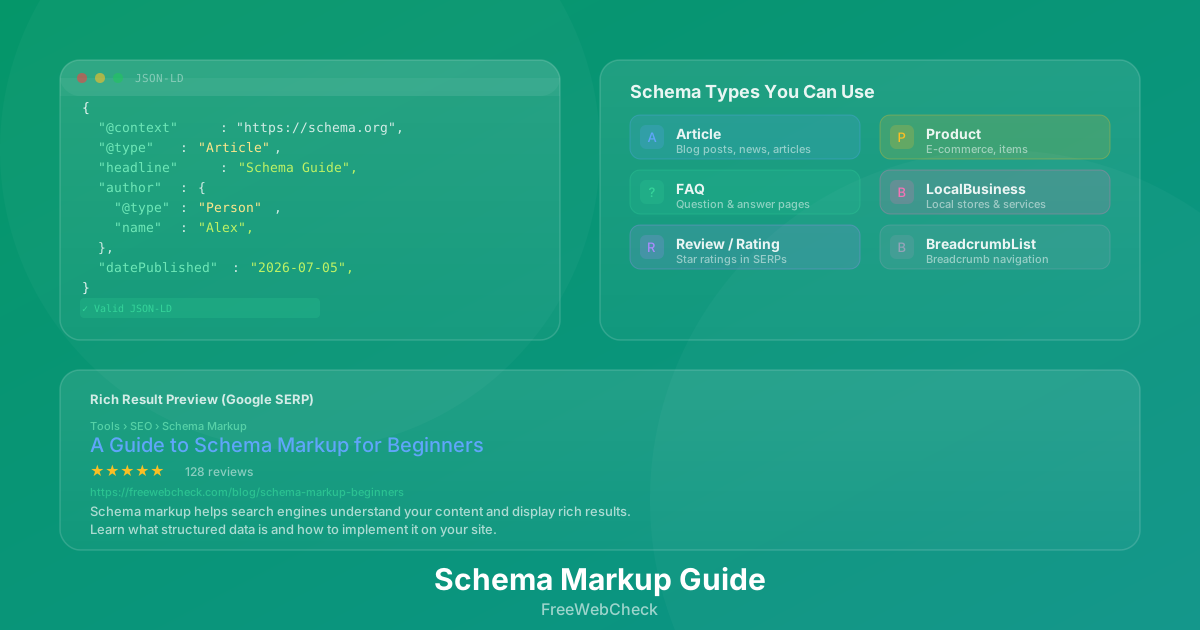
Google, Bing, and Yahoo created Schema.org in 2011, a shared vocabulary for structured data. You write it as JSON-LD (a JavaScript block in your <head>) and search engines read it. The format looks like this:
{
  "@context": "https://schema.org",
  "@type": "Article",
  "headline": "A Guide to Schema Markup",
  "author": {
    "@type": "Person",
    "name": "Alex"
  },
  "datePublished": "2026-07-05"
}
JSON-LD is the format Google recommends — easy to add and maintain, and it doesn’t touch your page’s visible content.
Why Bother with Structured Data?
Rich results stand out. When I search for “how to make sourdough bread” and see one result with a photo, prep time, and a 4.8-star rating next to a plain blue link, I click the rich result every time. Google’s research shows rich results can increase CTR by up to 30%.
Schema also helps with voice search and AI-generated answers — structured data makes it more likely your content gets pulled into those results.
The Schema Types That Matter Most
You don’t need to implement all 800+ schema types. Start with these:
- Article — For blog posts, news articles, and guides. Displays headline, author, publish date, and image in search results.
- Product — For e-commerce pages. Shows price, availability, and reviews. Essential for online stores.
- FAQ — For question-and-answer pages. Renders as an expandable accordion directly in search results, which takes up significant real estate on the SERP.
- LocalBusiness — For physical stores, restaurants, and service areas. Displays address, phone number, hours, and reviews.
- BreadcrumbList — Shows the navigation path to the page in search results. Helps users understand where they are on your site.
- Review / Rating — Adds star ratings to your search listing. Pair with Product or LocalBusiness for maximum impact.
These six cover most use cases for the average website.
How to Add Schema to Your Site
Three ways, from simplest to most involved:
- Use a plugin — On WordPress, Yoast SEO or Rank Math add schema automatically.
- Generate and paste — Google’s Structured Data Markup Helper walks you through tagging elements and generates the JSON-LD.
- Write it yourself — If you’re comfortable with JSON, hand-rolling gives you full control. Validate with the Rich Results Test before deploying.
After adding schema, run your page through the SEO Analyzer to confirm it’s detected and valid. The analyzer checks for JSON-LD presence and flags any issues.
Common Mistakes
A few things I’ve tripped over so you don’t have to:
- Mismatched data — Don’t mark something as “InStock” when the product is out of stock. Google checks, and mismatches can get your rich results removed.
- Missing required fields — Each schema type has required properties. Product needs
nameandoffers. Article needsheadlineandauthor. Leave one out and Google ignores it. - Marking hidden content — Don’t wrap schema around content users can’t see. Google’s guidelines prohibit marking up hidden or behind-login content.
- Using the wrong type — Tagging a FAQ page as Article won’t trigger the FAQ rich result. Use the exact type that matches your content.
Quick Checklist
Before publishing, validate your structured data against this list:
- Schema type matches the page content
- All required properties present for the chosen type
- JSON-LD validates in the Rich Results Test
- No mismatches between structured data and visible content
- BreadcrumbList added for navigation context
- Confirmed detected via the SEO Analyzer
A Note on Complexity
Schema markup is powerful, but it’s not magic. You can spend hours perfecting JSON-LD for a single page and see zero change in rankings if the underlying content isn’t good. The tradeoff is straightforward: schema helps you win the click, but your content wins the ranking. I’ve seen sites with perfect schema and mediocre content stay stuck on page three, while excellent content with no schema at all ranks first. Do both.
Check Your Site
Curious if your pages already have schema markup? Paste a URL into the SEO Analyzer — it checks for JSON-LD and all 18 other on-page signals. Takes five seconds, no sign-up needed.