FreeWebCheck
What Happens When You Type a Domain? A DNS Lookup Breakdown
Last week a friend told me their email wasn’t working. I checked their MX records — empty. Their domain had been live for two months and nobody could send them mail. That’s the thing about DNS: you don’t think about it until something breaks.
When you type freewebcheck.app into your browser, your computer has no idea what that is. It’s a word, not an address. The internet runs on numbers. So your browser does a DNS lookup to translate that domain into an IP address it can use. I built a free DNS lookup tool that shows exactly what’s happening under the hood.
How DNS Resolution Actually Works
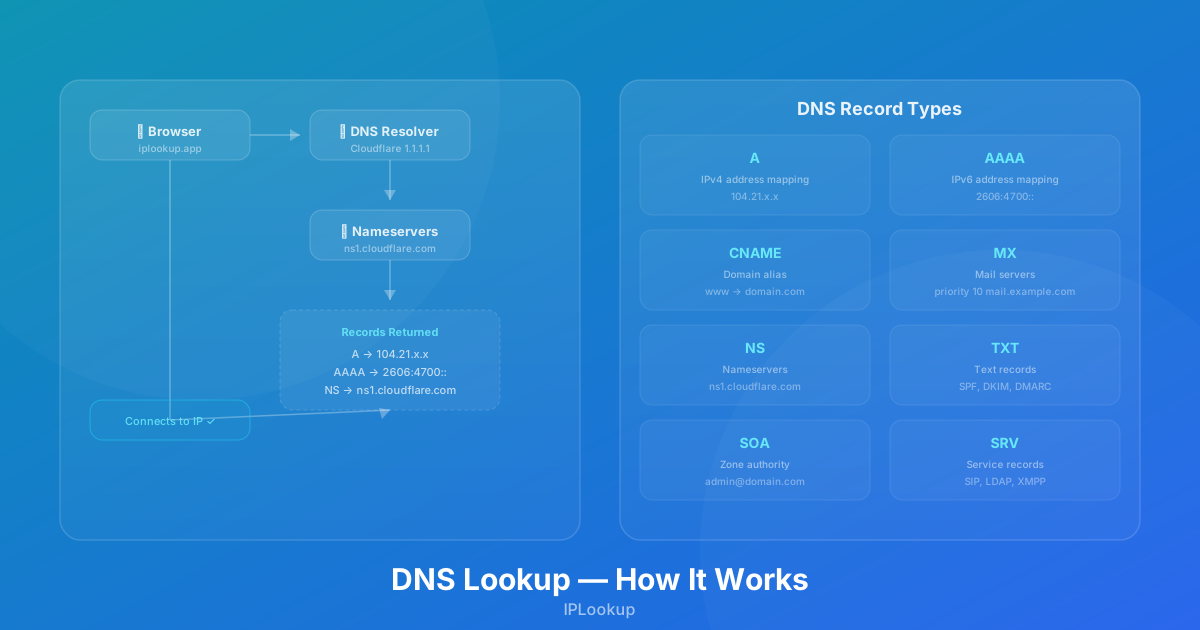
When you press Enter, here’s the chain: browser cache → OS cache → router cache → ISP resolver → root nameserver → TLD nameserver → authoritative nameserver → connection established. All in milliseconds. The DNS lookup tool lets you peek at the last step — querying the authoritative nameserver directly to see what records are configured.
The tool uses Cloudflare’s DNS-over-HTTPS API directly from your browser. Pick a domain, check the record types you want, and see the raw results instantly. No server-side processing, no logs, no tracking.
The Record Types
Here’s what each DNS record type actually does and when you’d care.
A and AAAA — The Main Event
The A record is the original DNS workhorse: it maps a domain to an IPv4 address like 192.0.2.1. When your browser loads a website, this is usually what it’s after. AAAA records do the same job for IPv6. Cloudflare’s DNS documentation explains that most domains need both record types for full reachability (source).
Most domains worth visiting have both. Modern browsers try IPv6 first and fall back to IPv4 if that doesn’t work. Check google.com in the tool — it resolves to both 142.250.80.46 (IPv4) and 2607:f8b0:4004:80c::200e (IPv6). If you get no AAAA results for a domain, it’s not reachable over IPv6. That matters if you’re targeting markets with high IPv6 adoption like the US, Germany, or India.
CNAME — The Alias
CNAME records let one domain point to another. www.freewebcheck.app has a CNAME pointing to freewebcheck.pages.dev. When a resolver hits that CNAME, it gets back the target domain and resolves it separately. Change the target once, and every alias follows.
One annoying limitation: a CNAME can’t coexist with other record types at the same node. You can’t have both a CNAME and an MX record on example.com. That’s why most domains use an A record at the apex and a CNAME for www. Per the DNS specification, a CNAME record must be the only record type at a given node — this is why the apex domain can’t have both (source).
MX and TXT — Email Infrastructure
I check MX records more often than most people because every time I switch email providers, I need to verify the setup. MX records tell senders where your mail server lives, each with a priority number — lower numbers get tried first. If the highest-priority server is down, the sender tries the next. A missing or incorrect MX record means nobody can email you, which is a fun discovery to make days later.
TXT records deserve special attention because they’ve become essential for email security. SPF records list which servers can send email from your domain. DKIM contains a public key for verifying email integrity. DMARC tells receiving servers what to do when email fails those checks — quarantine, reject, or deliver anyway. Without these, spammers can forge your domain in the From field and you’d never know.
TXT records are also how services like Google Search Console prove you own a domain. You add their verification string, they query it, and if it matches, you’re verified.
NS — Who’s in Charge
NS records are the chain of command — they list the authoritative name servers for a domain. These are the servers your domain registrar points to when someone queries your DNS. Change these, and you’ve changed who controls your entire DNS configuration.
This is the first thing to check when migrating to a new DNS provider. NS propagation can take 24-48 hours, but the lookup tool shows the new servers as soon as they’re visible.
SOA — The Blueprint
If DNS had a settings menu, the SOA record would be it. SOA (Start of Authority) contains the admin metadata: the primary nameserver, admin contact, and timing parameters — refresh, retry, expire, and minimum TTL.
If you’re troubleshooting DNS propagation delays, the SOA’s TTL values tell you how long you’ll need to wait. Common mistake: setting TTL too high before a migration. I’d change it to 300 seconds a few days ahead, then set it back after.
SRV — Service Discovery
SRV records are the odd ones — they specify a hostname and port for specific services like SIP (VoIP), LDAP, and XMPP. Not something most website owners deal with, but critical in enterprise setups. If you’re troubleshooting a business communication system, a missing SRV record is often the culprit.