FreeWebCheck
Free SEO Tools That Actually Work (No Credit Card Required)
When I started freelancing, I couldn’t justify spending $99 a month on an SEO tool. My clients were small businesses paying me $500 to build their sites — I wasn’t going to burn a fifth of that on a subscription. So I pieced together a workflow using free tools. Five years later, some of those free tools still outperform paid alternatives in specific areas.
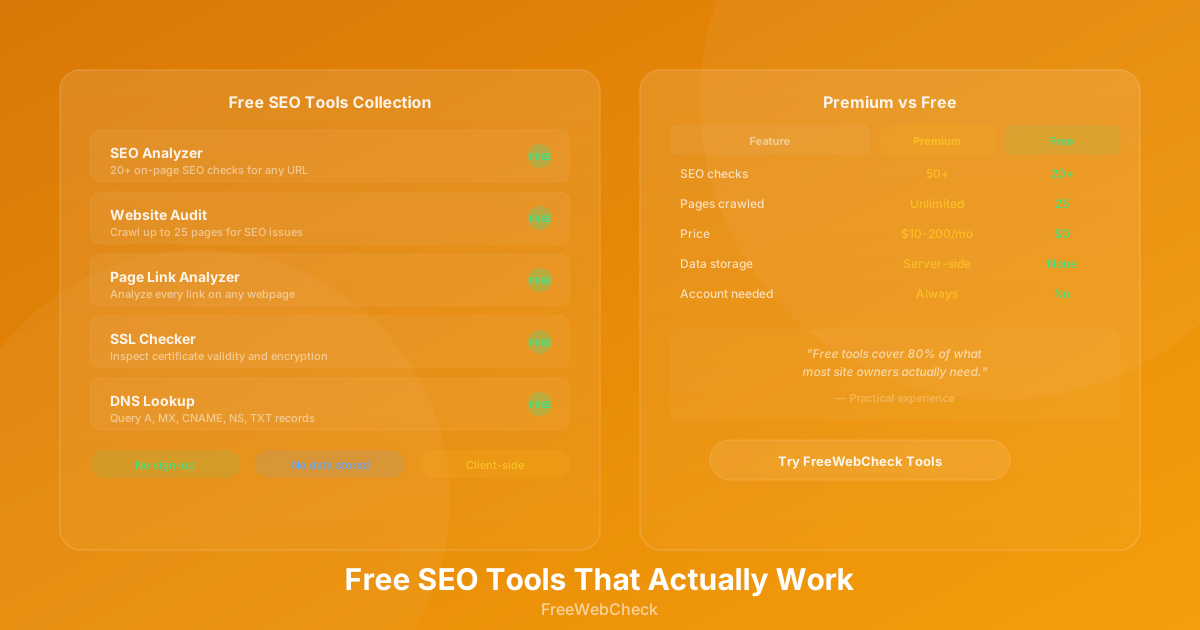
Here’s the toolkit I actually use. Every tool listed is free, doesn’t require an account, and runs without storing your data.
On-Page SEO Analysis
The SEO Analyzer runs 20 checks on any URL — title tags, meta descriptions, headings, image alt text, keyword density, readability, structured data, and more. Each check passes, warns, or fails with a clear explanation of why it matters.
What makes it different from most free checkers is the depth. It doesn’t just tell you “title tag is too long.” It shows a SERP preview of how your page looks in search results, calculates readability scores (Flesch-Kincaid), extracts JSON-LD schema types, and even checks for social meta tags.
I run every client page through this before publishing. The Content Freshness check alone has caught pages I forgot to update — always useful when a client says “we updated that page” and the date meta says otherwise.
Full Website Audits
The Website Audit tool crawls up to 25 pages and generates a report covering SEO, performance, security, and accessibility. It checks robots.txt and sitemap.xml compliance, scans for broken links, validates heading hierarchy, measures DOM size, and inspects SSL certificates.
This replaces a paid tool I used to subscribe to for monthly maintenance checks. The crawl finds issues page-by-page and groups them by severity. I schedule an audit after every deployment to catch problems before clients do.
For technical SEO, the audit includes checks that most free tools miss: HSTS headers, CSP configuration, print stylesheets, RSS feeds, and landmark accessibility elements.
Link Analysis
The Page Link Analyzer examines every link on a webpage and breaks them down by type: internal vs external, follow vs nofollow, anchor text distribution, and placement (header, content, footer, sidebar, navigation).
I use this for competitor analysis more than anything else. Drop a competitor’s URL into the analyzer and you can see their internal linking structure, which pages they prioritize, and how they distribute link equity. For guest posting, it helps you evaluate whether a site’s outbound link profile is healthy or full of paid links.
The toxic link detection flags suspicious TLDs, spam keywords, and redirect patterns. Not something you’d rely on for a full backlink audit, but useful as a quick sanity check.
SSL Certificate Checks
The SSL Checker inspects the full certificate chain for any domain. It shows the issuer, signature algorithm, key strength, TLS version, and validity period. It also runs a security checklist — certificate expiry, chain completeness, encryption strength, and HSTS configuration.
I check SSL certificates on every site I manage monthly. Let’s Encrypt certificates expire every 90 days, and automated renewal doesn’t always work. I’ve caught three near-expiry certificates this year alone because the renewal cron job failed silently.
DNS Lookup
The DNS Lookup tool queries A, AAAA, CNAME, MX, NS, TXT, SOA, and SRV records for any domain. It formats the results with color-coded record types and quick filter chips.
This is useful when diagnosing email delivery issues (check MX records), verifying domain ownership (check TXT records), or troubleshooting CDN configurations (check CNAME records). I use it most often when migrating sites between hosts — a quick DNS check confirms propagation before updating nameservers.
What Free Tools Don’t Do Well
Let’s be honest about the gaps. Free tools won’t replace enterprise platforms for everything:
- Historical data — Most free tools don’t track changes over time. You can save reports manually to your dashboard, but there’s no automated trend analysis.
- Competitor monitoring — You can analyze competitor pages one at a time, but there’s no batch competitor tracking. For that, you’d still need something like Ahrefs or Semrush.
- Keyword research at scale — Free keyword tools exist, but none match the depth of paid keyword databases. The tradeoff is acceptable for most small to medium sites.
- Crawl depth — A 25-page crawl covers most small to medium sites, but large e-commerce stores need more. For sites over 500 pages, you’d eventually need a deeper crawler.
The way I see it, free tools cover 80% of what most site owners actually need. Upgrade to paid tools only when you outgrow the free ones — not before.
Quick Checklist
- Run the SEO Analyzer on your homepage and top landing pages
- Schedule a full Website Audit after every deployment
- Check SSL certificates monthly (set a calendar reminder)
- Analyze competitor pages with the Link Analyzer
- Verify DNS records after changing hosting or email providers
- Save audit reports to your dashboard for trend reference