FreeWebCheck
How IP Location Works and Why It's Not Always Accurate
I once checked my IP from a coffee shop in Austin and got placed in Dallas — 200 miles away. IP geolocation gave me the wrong city without me doing anything unusual. That’s the norm, not a bug.
IP geolocation is useful, but it’s far from perfect. Here’s how it works, why it gets things wrong, and what you should actually expect from it.
How IP Geolocation Works
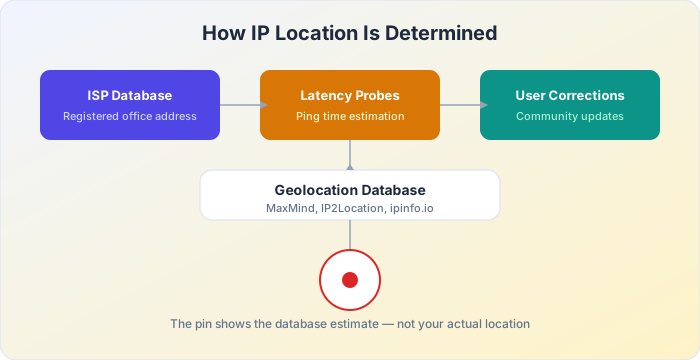
IP geolocation doesn’t use satellites, GPS, or any kind of physical tracking. Instead, it relies on databases that map IP address ranges to physical locations. Here’s where that data comes from:
ISP registration data. When an internet service provider registers a block of IP addresses, they provide the address of their business office or network hub. That address gets recorded in public WHOIS databases. If your ISP is headquartered in Dallas but you live in Austin, your IP might show Dallas instead. Cloudflare explains that IP geolocation databases derive location data from ISP registration, latency measurements, and third-party sources — which is why the location often reflects the ISP’s hub rather than the end user (source).
Network measurement and probing. Companies that provide geolocation data (like MaxMind, IP2Location, and the sources behind ipinfo.io) also use latency measurements. They ping IP addresses from known locations and estimate distance based on response times. This helps refine location estimates, but it’s still an approximation.
User-contributed corrections. Some geolocation databases accept corrections from network operators who report more accurate location data for their IP ranges. But not all ISPs bother to submit updates, so many entries remain outdated.
Why IP Location Is Often Wrong
There are several reasons why the location shown for your IP address might not match where you actually are:
ISP hub locations are the biggest source of error. A large ISP might serve customers across an entire state from a single hub, and geolocation databases associate your IP with the hub’s location. If you live 200 miles from that hub, the map shows the hub.
Mobile IPs make things worse. Your phone doesn’t have a permanent IP — carriers assign them from pools serving large areas. You could be in Miami today and get an IP registered to Atlanta, then travel to Orlando and see the same location.
VPNs and corporate networks route traffic through a central point. Connect to a VPN server in New York and websites think you’re in New York, even if you’re in Tokyo. Corporate traffic often routes through headquarters, so a remote employee in Chicago might show up in San Jose.
Carrier-grade NAT lets ISPs share one public IP across thousands of customers. Everyone behind it shows the same location. This is common with 4G and 5G home internet.
Outdated database records round out the list. IP ownership changes over time — ISPs merge, reallocate blocks, update infrastructure — and geolocation databases don’t always keep up. A record from 2018 might still show the old location for a range that moved years ago.
What IP Location Gets Right
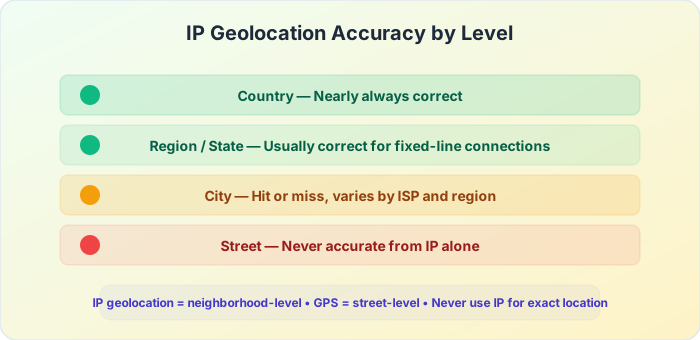
It’s not all bad. IP geolocation is generally reliable at certain levels:
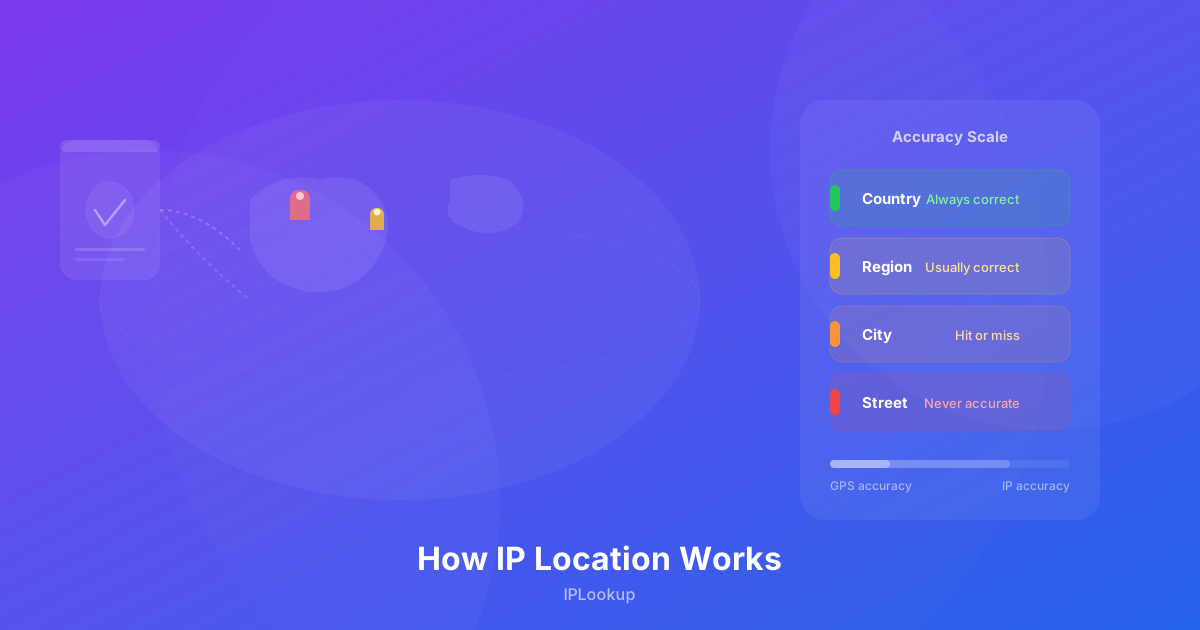
- Country level — Nearly always correct. Your IP almost always shows the right country.
- Region or state level — Usually correct for fixed-line connections. Mobile and VPN IPs are less reliable.
- City level — Hit or miss. Can be accurate in dense urban areas with local ISPs, but often wrong in rural areas or with large national ISPs.
- Street level — Never accurate. Any service claiming to show your exact street address from your IP is either guessing or using data you provided elsewhere.
How to Get a More Accurate Location
If you need accurate location data, IP geolocation isn’t the right tool. Here are better options:
- GPS — Accurate to a few meters. Available on any phone and most laptops.
- Wi-Fi positioning — Uses nearby Wi-Fi network locations. Works indoors and is reasonably accurate in cities.
- Cell tower triangulation — Less accurate than GPS but better than IP geolocation. Good enough to find a general area.
Why We Show It Anyway
When you visit our IP Lookup tool, the map shows the approximate location from your IP data. We include it because it’s useful for understanding what information your IP address reveals to websites, and it helps with debugging network issues. But we always include the 50-kilometer accuracy circle on the map so you can see the range of uncertainty.
Think of the pin as a rough hint at your general area, not your actual position. If it shows the right city, great. If it’s off by a state or two, that’s normal — and now you know why.
Frequently Asked Questions
Can websites see my exact location from my IP?
No. Websites can only see your approximate city or region, not your street address. To get an exact location, a website would need your explicit permission to access GPS data through your browser.
Does a VPN make my location less accurate?
Yes, intentionally. A VPN replaces your real IP with the VPN server’s IP, so your location will appear to be wherever the VPN server is located. That’s the whole point.
Why does my IP show a different city than my neighbor’s?
Your ISP might use different IP ranges for different neighborhoods, or one of you might be connected through a different network hub. It’s also possible one database is more up-to-date than another.
Can I correct my IP location?
Sometimes. Some geolocation providers accept corrections from end users. You can check the database used by a particular service and submit a correction if the location is consistently wrong.