FreeWebCheck
How to Choose a VPN Provider (I've Tested a Dozen)
I’ve tested maybe a dozen VPNs over the past few years. Some for a week, one or two for over a year as my daily driver. I started because I wanted to check my bank account from coffee shop Wi-Fi without feeling paranoid. What I learned is that most VPN review sites are worse than useless — they rank based on affiliate commissions, not actual performance. A service that pays 50% commission per sale gets a glowing review regardless of whether it leaks DNS queries.
Here’s what I’ve found actually matters, and what you can safely ignore.
The Stuff You Should Actually Check
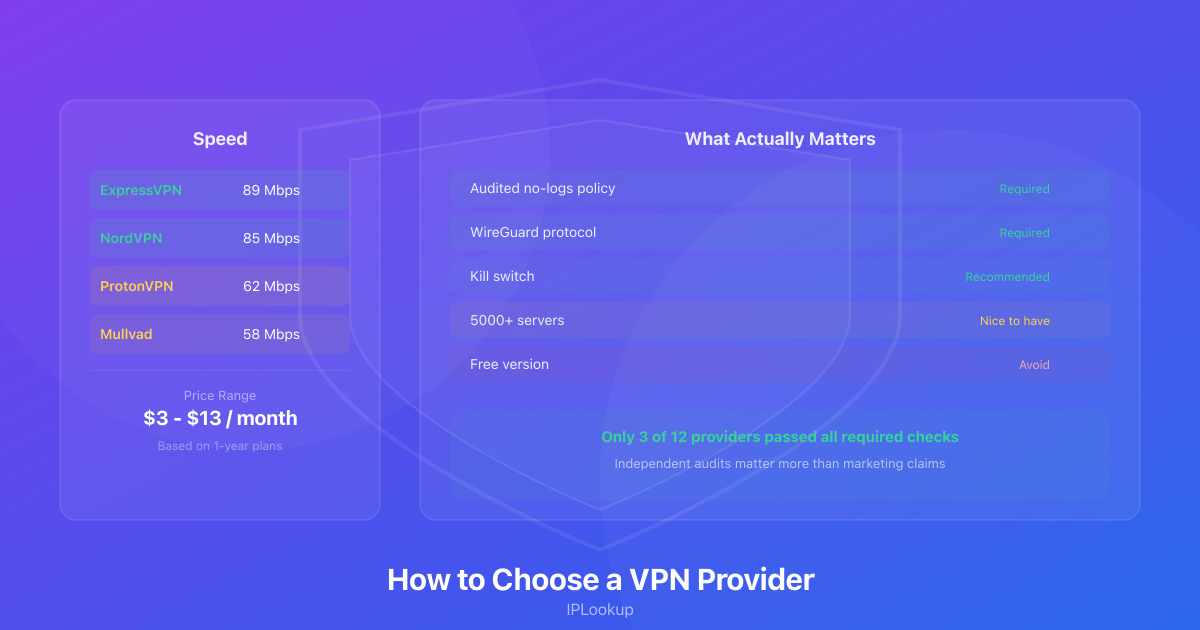
A no-logs policy matters, but only if it’s been audited. Every VPN says they don’t log your data — that’s the first sentence on every landing page. The question is whether a third party has verified it. Cloudflare emphasizes that a trustworthy no-logs policy should be independently audited, since the provider has full visibility into your traffic (source). Look for audits published by firms like Cure53 or PWC. ExpressVPN, NordVPN, Mullvad, and ProtonVPN have all done this. If your provider hasn’t published an independent audit, you’re trusting their marketing team instead of evidence.
A kill switch isn’t optional. If your VPN connection drops for half a second — which happens more often than providers admit — your real IP leaks to whatever site you’re on. A proper kill switch cuts your internet instantly when the VPN disconnects. Test yours: connect, then force-kill the VPN app. If your browser can still reach websites, your kill switch isn’t working.
Leak protection is where things get subtle. Most VPN apps handle IPv6 and DNS leaks these days, but WebRTC leaks are still common. WebRTC is a browser feature for voice and video chat that can bypass your VPN and reveal your real IP. I found this out when I checked my IP with our VPN detection tool while connected to a well-known VPN — my real Nigerian IP was still visible because the browser was leaking through WebRTC. The fix was a browser extension that blocks WebRTC.
The Stuff That Sounds Important But Isn’t
Server count is the biggest marketing gimmick in the VPN industry. Five thousand servers sounds impressive. But most users connect to the same 20-30 servers near their location. What matters is whether the provider has servers where you actually need them. Want to access a specific streaming library? Check that they have servers in that country that aren’t blocked. I’ve used VPNs with 3,000 servers that couldn’t unblock Netflix, and a provider with 60 servers that did it easily.
Double VPN and Tor-over-VPN are features you’ll see on premium plans. They route your traffic through multiple servers for “extra security.” In practice, they make your connection painfully slow and provide minimal benefit unless you’re a journalist or activist under specific threat. For everyone else, single-hop VPN is fine.
Built-in ad blockers and malware filters? The ones baked into VPNs are rarely as good as uBlock Origin. They also break legitimate sites, and you’ll waste time figuring out why a page isn’t loading properly. Just install a proper ad blocker separately.
A Quick Word About Free VPNs
I’ll be direct about this: free VPNs cost something, it’s just not money. Most free providers log your data and sell it. Some inject ads. A few have been caught bundling malware. If you’re not paying for the product, you are the product. There are exceptions — ProtonVPN’s free tier is genuinely privacy-respecting — but they’re rare.
What I Use and Why
After all the testing, here’s my shortlist:
Mullvad is my daily driver. $5 a month, flat rate, no email required, they accept cash in the mail. They’ve been audited, they’re fast, and the app is simple. I pay for five months at a time and forget about it.
ProtonVPN is what I recommend for people who want a free option. The free tier has no data caps and no ads. Paid plans are reasonably priced and fast. Based in Switzerland, which helps.
ExpressVPN is what I use when I need to access streaming content from another country. It’s expensive — $13 a month — but it consistently works with Netflix, BBC iPlayer, and Hulu when other VPNs get blocked. They’ve published multiple independent audits.
The best VPN is the one you’ll actually use every time. A technically superior service that’s annoying to turn on is worse than an okay service you don’t have to think about. Pick one, run it through our IP lookup tool to verify it’s working, and make it a habit on any network you don’t control.