FreeWebCheck
I Built a Free SEO Analyzer — Here Are the Checks It Runs
I spend a lot of time thinking about SEO. But knowing what to optimize and actually doing it are two different things. So I built a tool to make it easier.
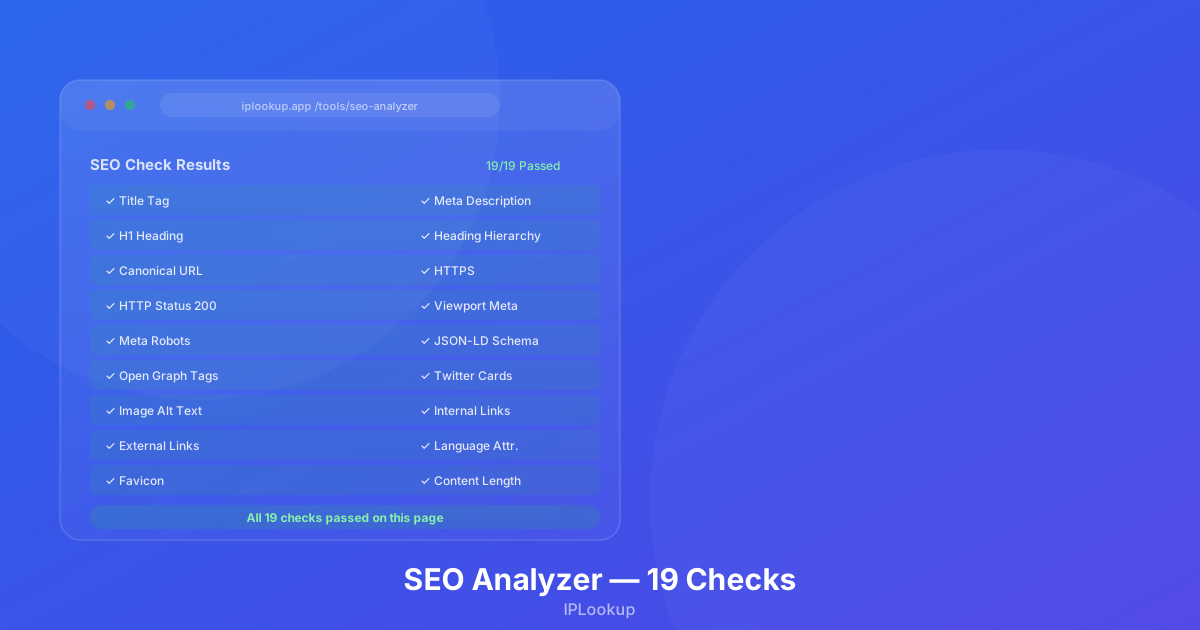
I wrote a free SEO analyzer that takes any URL, fetches the page, and runs 19 on-page checks. No sign-up, no limits, no tracking. Just paste a URL and see what’s working and what isn’t.
The first time I ran it on a client’s site, it scored 42/100. The title tag was missing, no H1, half the images lacked alt text. The client had been wondering why their site wasn’t ranking. That score told the story.
The 19 Checks
I split the checks into three buckets: Critical, Important, and Suggestion. Each has an impact weight — fix Critical items first for the biggest score improvement.
Critical — Fix These First
These determine whether search engines can crawl, index, and rank your page. Fail any of these and you’re at a significant disadvantage.
- Title tag — Present? Between 30 and 60 characters? Good titles are descriptive, include your target keyword, and are unique across your site. Duplicate titles hurt your chances.
- Meta description — Written and compelling? Meta descriptions don’t directly affect rankings, but they drive click-through rates. Aim for 120-160 characters with a call to action. Plenty of SEOs argue over whether they matter — my take is that a good description never hurts and often helps.
- H1 heading — Exactly one per page. Multiple H1s confuse search engines. A missing H1 means no clear primary heading.
- Heading hierarchy — H1 → H2 → H3 in logical order? Skipping levels is a poor experience and looks sloppy.
- Canonical URL — Defined and pointing to the right version? Without it, search engines may index multiple URL variations separately. Google Search Central explains that canonicals tell search engines which version is the master copy (source).
- Viewport meta tag — Set for mobile? Without it, mobile browsers render at desktop width and zoom out. Tiny text, frustrated users.
- Meta robots — Accidentally blocking indexing with
noindex? Happens more than you’d think, especially on staging sites promoted to production. - HTTP status — Returning 200? A 404, 301, or 500 means search engines won’t index the page you want them to.
- HTTPS — Served over a secure connection? Google uses HTTPS as a ranking signal and browsers flag non-HTTPS as “Not Secure.” Google confirmed this in 2014 (source).
Important — Strongly Recommended
These are signals Google and other search engines consider for page quality and relevance. Alone they won’t break your SEO, but fixing them across your site compounds.
- JSON-LD schema — Structured data helps search engines understand your content and enables rich results like star ratings, FAQs, and product snippets.
- Open Graph tags — Controls how your page appears when shared on Facebook, LinkedIn, or Slack. Without them, the preview is often broken or unappealing.
- Twitter Cards — Same idea, specific to X (formerly Twitter). Lots of sites remember OG tags but forget Twitter Cards.
- Image alt text — Helps screen readers and gives search engines image context. Also your best shot at ranking in Google Image Search.
- Internal links — Distribute PageRank, help search engines discover pages, keep users on your site. Simple and effective.
- External links — Pointing to authoritative sources builds credibility. Just don’t overdo it — too many outbound links can distract readers.
- Language attribute — The
langattribute on<html>tells browsers and screen readers which language you’re using. Quick to add, easy to forget. - Favicon — Shows in browser tabs, bookmarks, search results. Small detail, but it affects brand recognition.
Suggestion — Nice to Have
These move the needle on UX and long-term SEO but aren’t urgent.
- Content length — Pages under 300 words are “thin content.” Word count isn’t a direct ranking factor, but thin pages rarely satisfy user intent enough to rank well.
- SPA detection — JavaScript-heavy sites can confuse crawlers. If your site relies on client-side rendering, consider server-side rendering or prerendering.
How the Scoring Works
Each check has an impact weight: Critical (3), Important (2), or Suggestion (1). Passing counts as 1, warnings as 0.5, failures as 0:
(pass × 1 + warn × 0.5 + fail × 0) × impact / totalImpact × 100
A perfect 100 means you’ve passed all 19 checks. Miss both Suggestions but nail everything else? You’re at roughly 89. The weighting nudges you to fix Critical items — they pull the most weight.
What I Found on My Own Site
Running the analyzer on FreeWebCheck was humbling. Missing meta descriptions on several tool pages. Heading hierarchy inconsistent — H3s jumping in before H2s existed. A couple of pages without proper OG tags.
I also found blog posts with thin content — under 300 words — that weren’t pulling their weight. The analyzer flagged them, so I went back and expanded them with more practical detail.
I fixed all of it. The analyzer page itself scores 100% — I made sure of that. Honestly, running the full checklist was more eye-opening than I expected. Building the tool was one thing; seeing my own site’s results was another.
How to Use the Results
The analyzer gives you a clear checklist. Here’s the order I’d work through:
- Fix Critical failures first — Missing title tags, missing H1s, wrong HTTP status codes. These block search engines from understanding your page.
- Fix Important failures next — Add structured data, set up OG tags, improve internal linking. These compound over time.
- Consider Suggestions last — Expand thin content, evaluate SPA rendering needs.
- Re-test after changes — Run the analyzer again. Watching the score climb is oddly satisfying.
Check Your Own Site
I built this because I got tired of hitting paywalls just to run a basic SEO check. Paste a URL, see what’s broken, fix it, move on. No account, no limits, no tracking.
Give it a try: SEO Analyzer → — get your complete on-page SEO report in seconds.