FreeWebCheck
What Is a VPN Detection Checker and How Does It Work?
I’ve tested about a dozen VPNs over the past few years. What surprised me: some of the most expensive ones showed up as “datacenter” immediately. A cheap one nobody talks about passed as residential. I wouldn’t have known without running a detection check.
That’s what this tool does — it looks at your IP and tells you whether it reads as a VPN, a proxy, a datacenter, or a normal home connection. Here’s how it works and why you might care.
What Is VPN Detection?
Every IP address is assigned to an organization. Residential IPs belong to ISPs like Comcast or Verizon. VPN IPs belong to companies like NordVPN or Mullvad. Datacenter IPs belong to cloud providers like AWS or Hetzner. Cloudflare explains that IP blocks are allocated by regional internet registries (RIRs), and you can trace ownership through WHOIS and ASN lookups (source).
A VPN detection tool checks the organization behind an IP. If it belongs to a known hosting or VPN company, the tool flags it.
That’s the simple version. The reality is messier.
How Our VPN Checker Works
The free VPN check tool on FreeWebCheck takes a straightforward approach:
- Fetches your IP and geolocation from ipinfo.io
- Examines the organization (org) and ASN
- Checks against known hosting providers, cloud platforms, and VPN companies
- Also looks at connection type indicators like mobile carrier networks
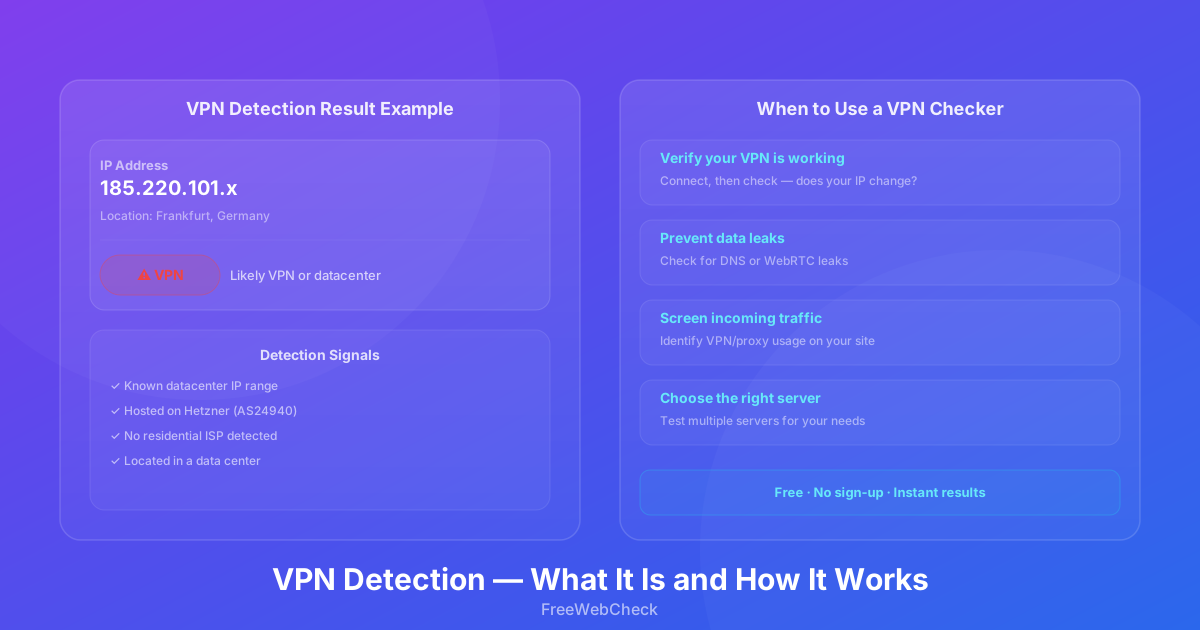
The result tells you whether your connection appears to be:
- Residential — Standard ISP (home or office)
- Hosting — Datacenter or cloud provider
- Mobile — Cellular network
- VPN — Known VPN provider
- Unknown — Can’t confidently categorize
Why Would You Check?
Verify Your VPN Is Working
Most common use case. Connect to your VPN, visit a checker, confirm your IP changed. If it shows your real location and ISP, something’s wrong — DNS leak, kill switch issue, or misconfiguration.
Check for Leaks
A good VPN hides your IP. If you see your real ISP after connecting, something is leaking. Common causes: WebRTC leaks in browsers, IPv6 leaks (if your VPN doesn’t support IPv6), or DNS requests bypassing the tunnel.
Choose the Right VPN Server
Not all servers are equal. Some are more likely to be detected than others. By testing different servers with a checker, you can find one that appears more “residential” for situations where you want to avoid detection. I’ve found that servers in less popular locations often pass more easily than major hubs.
Screen Traffic on Your Services
Run a website? VPN detection helps with fraud detection, bot filtering, and regional restrictions. Just don’t rely on it alone — more on that below.
What Affects Detection Accuracy
VPN detection isn’t perfect. Here’s where it gets tricky:
IP range classification. Some ranges are clearly labeled as datacenter. Others are ambiguous. A small VPN provider might use IPs from a range classified as residential, making detection harder. That cheap VPN I mentioned earlier? That’s exactly what they were doing.
Shared hosting IPs. If a VPN runs on AWS or Google Cloud, the IP gets flagged as hosting regardless of the provider. Nothing the VPN can do about it.
Residential IP proxies. Services like BrightData use IPs from real residential ISPs. These are extremely difficult to detect because they’re indistinguishable from normal home connections. They also cost significantly more.
Mobile IPs. Carrier IPs are often misidentified due to CGNAT (Carrier-Grade NAT). Multiple users share a single IP, making classification unreliable. Cloudflare describes CGNAT as a method ISPs use to conserve IPv4 addresses by sharing one public IP across many customers (source).
How to Use the VPN Check Tool
The VPN detection tool is dead simple:
- Visit the page — it detects your IP automatically
- Review the result — IP, location, ISP, connection type
- If connected to a VPN, verify the location matches your VPN server
Nothing to install. No configuration. Runs in your browser, fetches data from public APIs.
How VPNs Can Avoid Detection
If you want your VPN usage to be less detectable:
Obfuscated servers. Some VPNs offer servers that mimic regular HTTPS traffic. Harder to identify.
Lesser-known providers. Large VPNs have well-known IP ranges that get flagged faster.
Dedicated IP. Some VPNs offer dedicated IPs not shared with other users. Less likely to appear in detection databases.
Combine with Tor. Route through VPN then Tor (or vice versa). Much harder to detect, much slower to use. I’ve tried this — it works, but browsing becomes painful.
Limitations
Here’s the honest part. VPN detection can’t determine whether a specific user is using a VPN — it can only classify the IP address. A residential IP doesn’t mean someone isn’t using a VPN (split tunneling exists). A datacenter IP doesn’t guarantee VPN usage (legitimate businesses host services there).
Use VPN detection as a helpful signal. Not a definitive answer.